SEO
Join 500+ brands growing with Passionfruit!
ChatGPT Ads opened to U.S. advertisers of any size on May 5, 2026, when OpenAI dropped the minimum spend requirement and rolled out a beta self-serve Ads Manager. Setup takes around an hour for a basic campaign, plus a manual review wait. The steps below walk through the exact sequence in OpenAI's Ads Manager Beta, with the operational details (character limits, account caps, reporting lag) that most other guides leave out.
Before you start using Chatgpt Ads
A few things to confirm before you open Ads Manager Beta. ChatGPT Ads are currently available to advertisers in the United States, Canada, Australia, and New Zealand. Eligible categories include household and consumer goods, local services, travel and experiences, and digital products and education. Dating, alcohol, tobacco, healthcare, financial and legal services, gambling, and political content are excluded.
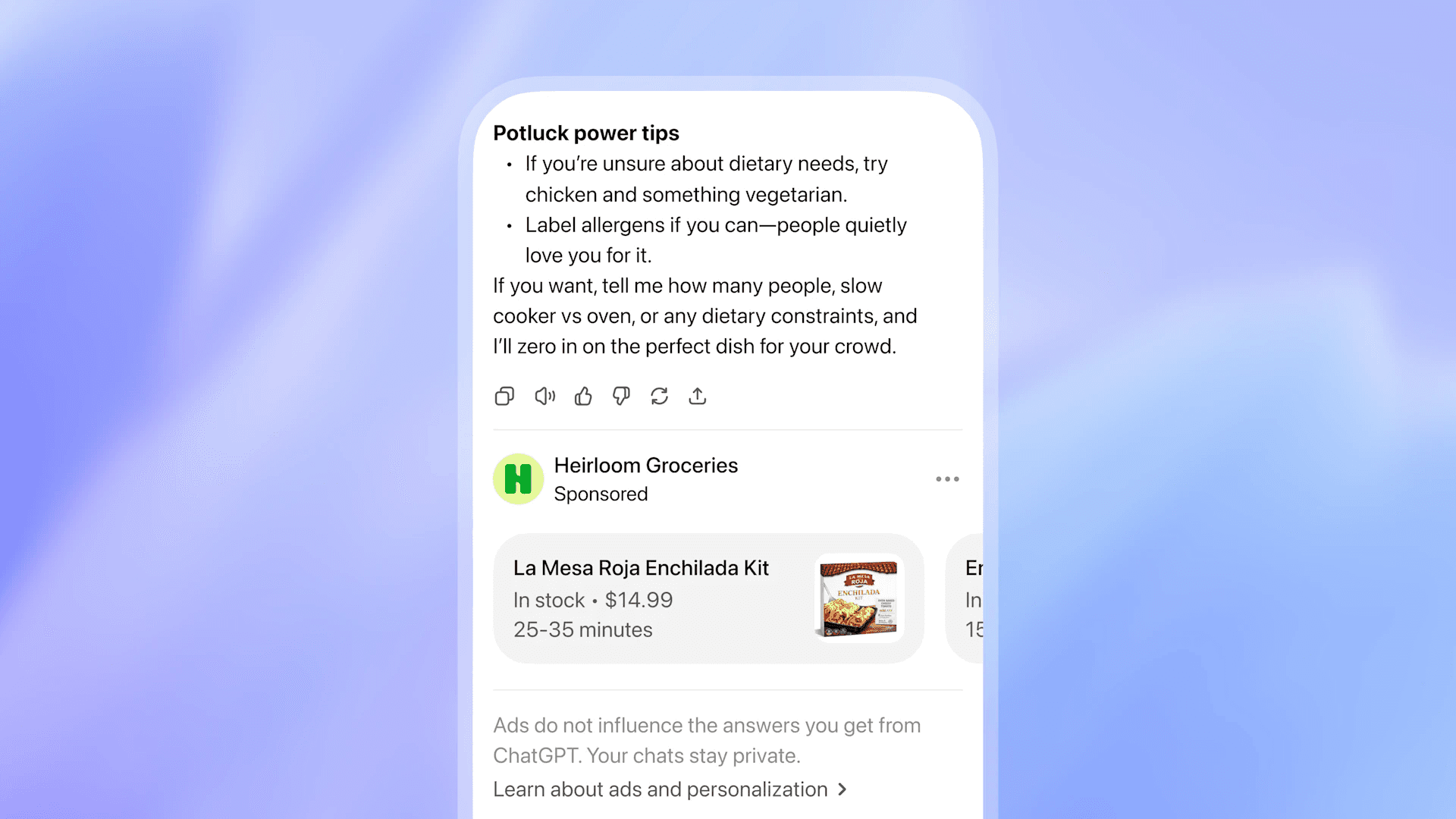
Ads only appear to logged-in adults on the Free and Go ($8/month) tiers. Plus, Pro, Business, Enterprise, and Edu users see no ads, and accounts predicted to be under 18 are excluded. If your category is restricted, this is where to stop. If your category is eligible, work through the steps below in order. Each step assumes the previous one is complete.
How to set up your first ChatGPT Ads campaign
Step 1: Run a pre-flight check on your assets
Before opening Ads Manager Beta, confirm you have these ready. Missing pieces are the most common reason setup stalls before launch.
A working OpenAI account tied to a business email (or a personal one you can convert).
A business name, address, and tax/VAT identifier.
A credit card and an invoice delivery email.
A landing page or destination URL that matches the product or service you plan to advertise. Generic homepages with no conversion intent often fail review.
An advertiser favicon (your brand logo) sized for the ad unit.
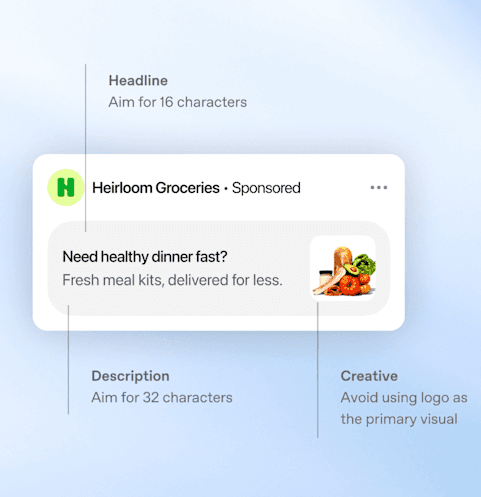
3–5 ad creative variations: title, copy, and an image. Title length must fall between 16 and 24 characters. Copy length must fall between 32 and 48 characters. Image minimum is 256x256 pixels, square recommended.
UTM parameter conventions for tracking. ChatGPT Ads pass UTMs through on click into your existing analytics.
A baseline audit of what AI surfaces already say about your brand. Paid placement amplifies an existing position. If your brand is missing from organic AI citations entirely, that is a content and generative engine optimization problem to fix in parallel, not after the paid spend goes live.
Step 2: Create your Ads Manager Beta account
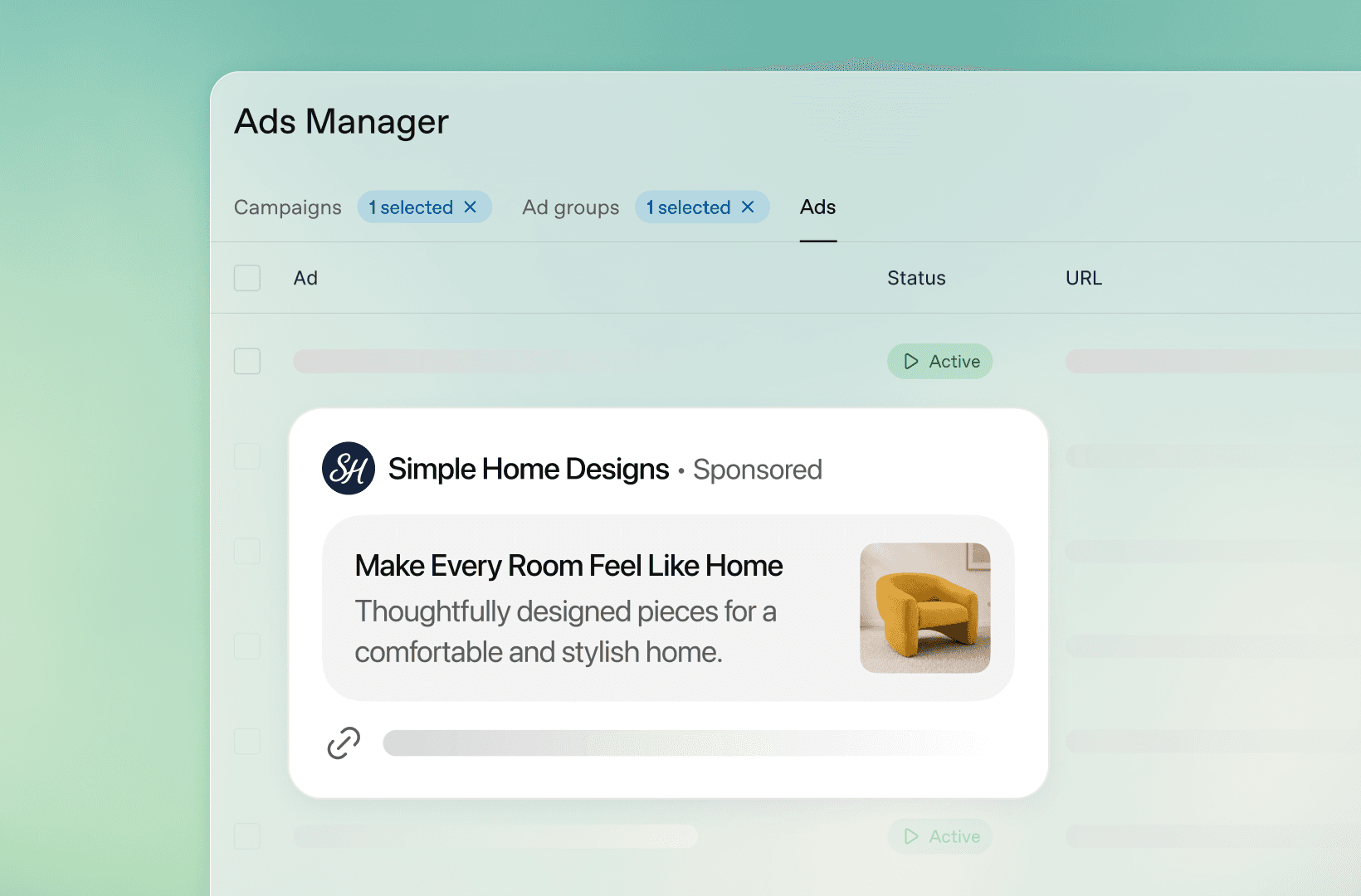
Go to ads.openai.com and sign in with the OpenAI account you want to attach to the advertiser. Each business creates one account, owned by one person, who then invites teammates. The account owner cannot be changed without contacting support, so pick the right person before clicking through.
During sign-up, enter the business details: legal business name, address, primary business category from OpenAI's taxonomy, and a verified payment method. Account verification is manual. OpenAI's team reviews the application and emails when full platform access is available. Expect a wait of several business days. Campaigns will not deliver until the account is approved and billing is fully configured.
Step 3: Set up billing and invite teammates
Inside Ads Manager Beta, create a billing profile (business name, business address, invoice delivery email) and add a payment method (credit card and billing address). Both must be complete before campaigns can deliver.
Once billing is live, open Settings → Users → Invite and add the email addresses of teammates who need access. Each advertiser account requires its own account, so agencies running multiple clients will manage multiple advertiser accounts.
Step 4: Build the campaign
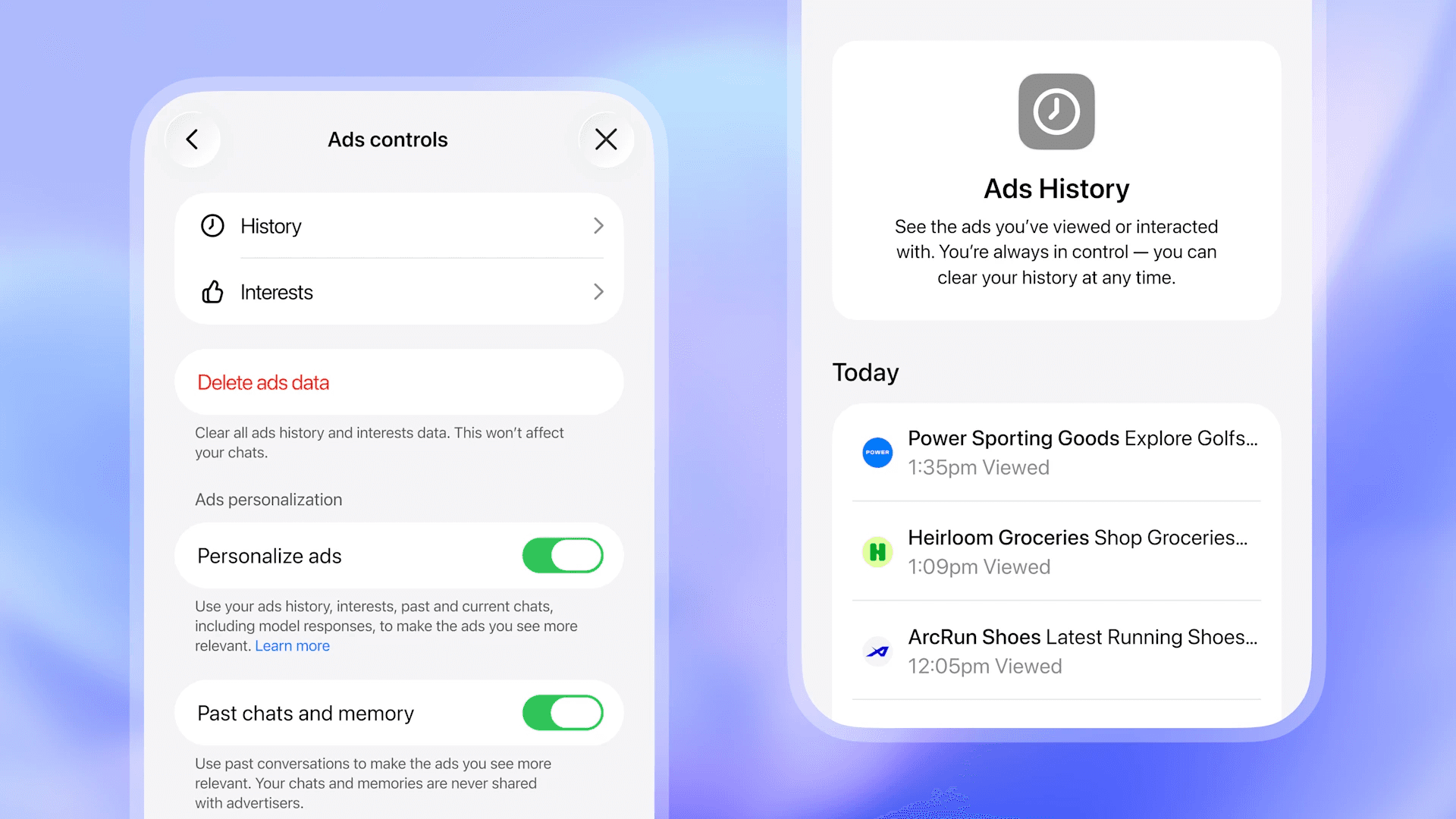
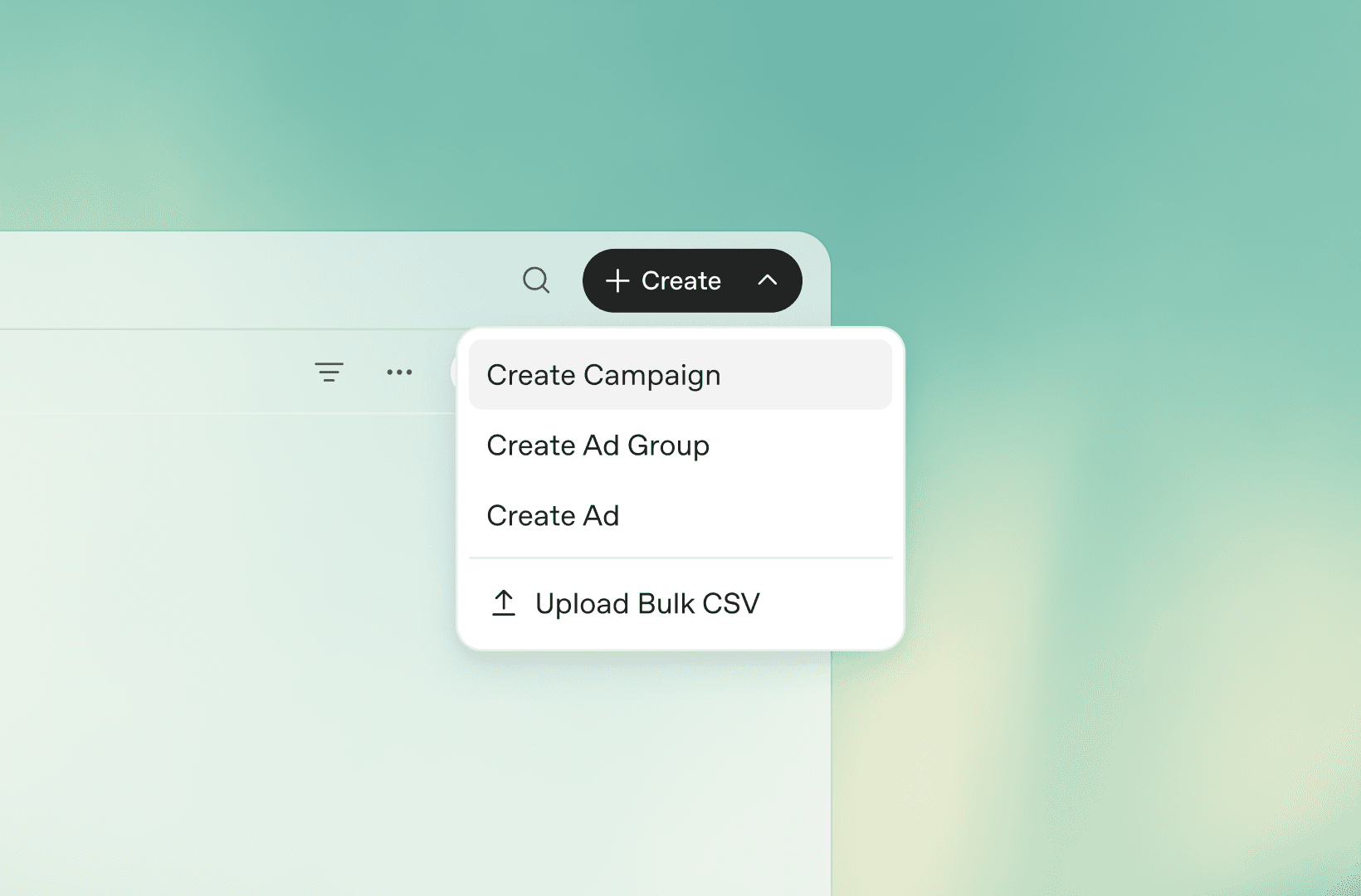
Ads Manager Beta supports two creation flows. Guided campaign creation walks through each setting in the UI step by step. Bulk upload uses a CSV schema template available under Create → Upload bulk, which is the faster path for launching multiple campaigns at once.
A campaign is the top-level container and defines the objective, budget, and country targeting. The current objectives are Reach (buys on CPM, default max bid $60) and Clicks (buys on CPC, recommended starting max bid $3–$5 USD). Pick Clicks for a first test if your goal is measurable performance, and Reach if the goal is brand exposure inside a category.
Set a daily or lifetime budget. There is no minimum spend at the platform level, but daily budgets below roughly $50 generate too little volume to learn from. A test budget of $100–$300 per day for the first two weeks is a reasonable middle ground for most categories.
Step 5: Build the ad group (this is the most important step)
Ad groups live inside campaigns and define the targeting. The ad group is where most first-time advertisers under-invest, and the consequence is uneven delivery.
The targeting mechanism is context hints: short phrases that describe the conversations, topics, or intents where your product is relevant. Context hints are not keywords. OpenAI's matching system uses them as interpretive guides, weighed against your ad copy, landing page, and the live chat thread.
A good context hint set is specific, not broad. For an accounting software product, hints like "small business accounting," "tax preparation," "invoicing workflow," and "QuickBooks alternatives" are usable. A single hint like "accounting" is too vague to deliver consistently.
Aim for 5–10 context hints per ad group, all tightly clustered around one intent or persona. If you need to target a second intent, create a second ad group rather than mixing intents inside one. Each account can hold up to 5,000 campaigns, 5,000 ad groups, and 5,000 ads, so structure has room to grow.
Step 6: Build the ad
Each ad needs five elements:
Advertiser name + favicon. Pulled from your account settings.
Title. 16 to 24 characters. The hard ceiling is unforgiving, so write tight.
Copy. 32 to 48 characters. Same constraint.
Image. Minimum 256x256 pixels, square recommended.
Landing page URL. Add UTM parameters here so traffic attributes correctly downstream.
Write 3–5 ad variants per ad group, each testing a different value proposition (not just different wording of the same one). Time savings versus cost savings versus ease of use are three genuinely different reasons someone might click. The auction is relevance-weighted, which means a stronger-matching ad with a lower bid often beats a worse-matching ad with a higher bid. Better creative pays back in delivery, not just CTR.
Step 7: Submit for review and confirm delivery
Submit the campaign for review. Approval times vary, but most campaigns clear within 24 hours if creative and landing pages comply with OpenAI's ad policies. If an ad gets marked "Not serving," hover over the status in Ads Manager Beta to see the specific reason. Most issues are fixable by editing the offending field and resubmitting. A small share of ads get rejected outright for policy violations.
Once approved, campaigns typically start delivering within 24 hours. Note the reporting delay: there is up to a 7-hour lag between when an ad delivers and when impressions and clicks appear in the Ads Manager dashboard. Do not panic-pause a campaign at hour two because the report shows zero impressions.
Step 8: Read the early signals
Ads Manager Beta reports impressions, clicks, spend, click-through rate, average CPC, average CPM, and conversions in a table view with chart and CSV export options. For the first week, focus on three signals:
Are ads serving at all? If impressions stay near zero after 48 hours, your context hints are too narrow or too vague. Broaden the hint cluster or rewrite them around the actual phrasing your buyers use.
CTR by ad variant. Identify which of your 3–5 variants pulls best. Pause clear underperformers after the ad group has accumulated at least a few hundred impressions per variant.
Cost-per-click trend. CPMs on the platform have dropped from $60 at launch to as low as $25 in some auctions. CPC ranges between $2.50 and $8 depending on category. If your CPC is consistently above the $3–$5 starting range, your ad group is competing in a more saturated category and the bid likely needs adjustment.
Step 9: Add conversion tracking (week two)
OpenAI provides a JavaScript pixel and a Conversions API (CAPI) for measuring downstream events. Install the pixel on your landing page and configuration pages (signup, purchase, thank-you). For server-side tracking, set up CAPI to send events from your backend.
OpenAI retains ownership of the pixel itself, which means you cannot create it independently. The platform sends you the pixel based on the events you want to track. Once installed, conversion events flow into Ads Manager Beta alongside impressions and clicks.
A CPA bidding option is on OpenAI's near-term roadmap but is not yet available. Until it ships, treat conversion data as a measurement input you optimize toward manually by pausing underperforming context hints and shifting budget to the ones generating qualified actions.
Step 10: Iterate on a 30-day cadence
The first 30 days are diagnostic, not performance optimization. Use them to learn which context hints actually deliver, which creative angles convert, and what conversation contexts produce qualified traffic.
After 30 days, you should know enough to make two or three concrete moves: kill the ad groups that are not delivering, double the budget on the one or two that are, and write a second creative round targeting the same intents that worked in round one. The brands that win the next two years on ChatGPT Ads are the ones running this diagnostic loop monthly while the platform is still uncrowded, not the ones waiting until CPCs triple.
Start with the foundation, then layer paid on top
ChatGPT Ads work hardest when the brand they are amplifying already has organic visibility inside AI surfaces. Paid placement below the AI's answer carries the click, but the answer itself still recommends whoever the model already cites. If your brand is missing from those citations, paid spend papers over a gap that fixed content would close permanently.
The cleanest first step before any paid budget activates is a baseline audit across ChatGPT, Perplexity, Gemini, and Google AI Overviews. Look at how Passionfruit's GEO services approach the audit, see the citation tracking inside Passionfruit Labs, and talk to the team before the next budget cycle locks in.
Frequently asked questions
The questions below come up most often when marketers spin up their first ChatGPT Ads campaign.
How long does it take to get approved for ChatGPT Ads?
Account verification is manual and typically takes a few business days. Once approved, individual ad approval is faster, usually within 24 hours of submission, assuming the creative and landing page comply with OpenAI's ad policies.
What is the minimum budget for ChatGPT Ads?
There is no platform-imposed minimum spend after May 5, 2026. The previous $250,000 minimum was dropped when the self-serve Ads Manager opened. A practical floor for testing is around $50–$100 per day, which generates enough volume to learn from inside two to three weeks.
Do I need to bid on keywords?
No. ChatGPT Ads use context hints, not keywords. Context hints are short phrases describing the conversations and intents where your product is relevant. OpenAI's matching system uses them as interpretive guides rather than exact-match triggers, which means you write hints in the language buyers actually use, not in keyword-tool syntax.
What are the ChatGPT Ads character limits?
Title length is 16 to 24 characters. Copy length is 32 to 48 characters. Image minimum is 256x256 pixels, square recommended. Each account can hold up to 5,000 campaigns, 5,000 ad groups, and 5,000 ads.
How are ChatGPT Ads priced?
ChatGPT Ads support both CPM and CPC buying. Default max CPM bid is $60, though some auctions have cleared as low as $25 since the platform opened. Recommended starting CPC bid is $3 to $5 per click. The auction is relevance-weighted and second-price.
When will I see results in the dashboard?
Campaigns typically start delivering within 24 hours of approval. There is up to a 7-hour lag between when ads deliver and when impressions and clicks appear in Ads Manager Beta. Plan reporting reviews around that delay rather than checking the dashboard in real time.
Can I run ChatGPT Ads if my brand has no organic AI visibility?
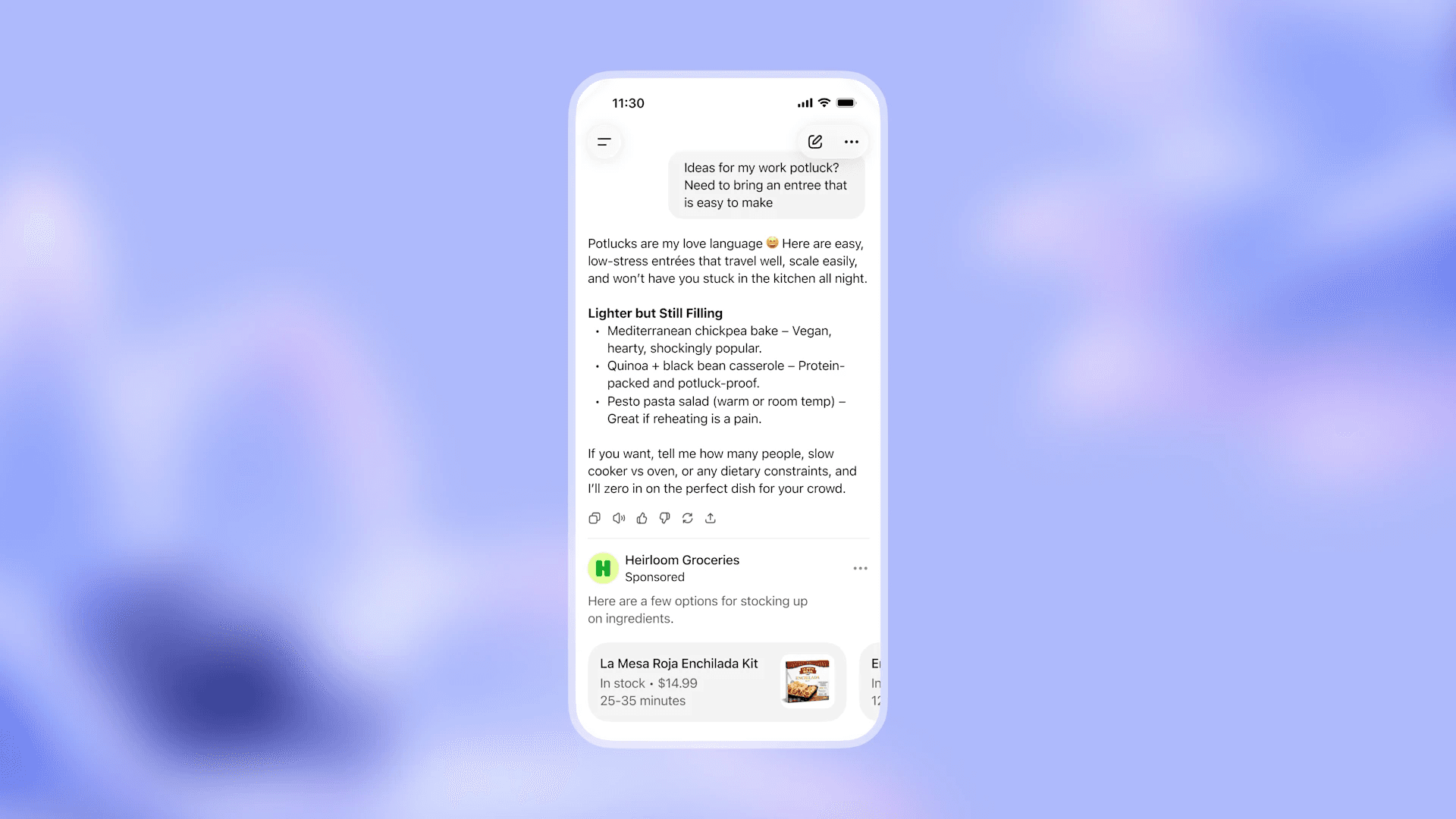
Yes, but you will get less return from the spend. ChatGPT Ads place a sponsored card below the AI's response without changing the response itself. Brands that already earn citations inside the answer get compound visibility (cited above, advertised below). Brands without organic citations get only the ad placement, which works but underdelivers compared to a paid plus earned combination.