SEO
Join 500+ brands growing with Passionfruit!
How to set up Claude Projects that eliminate the "cold start problem" for every marketing function. Copy-paste custom instructions for SEO, content, email, paid media, and social. Plus the organization system that keeps five Projects from overlapping.
Every time you start a new Claude conversation, you pay a context tax. You re-explain your brand, your audience, your tone, your product, your competitors, and your goals. That takes 5 to 10 minutes per session. If you use Claude 10 times a day, you waste 50 to 100 minutes daily just setting the stage.
Claude Projects eliminate that tax entirely. A Project is a persistent workspace with custom instructions and uploaded documents that carry across every conversation you start inside it. You set the context once. Claude references it automatically, every time.
But most marketers either skip Projects entirely (and get generic output) or create one giant "Marketing" Project that tries to do everything and does nothing well. The result: Claude that sounds like every other AI, producing content you have to rewrite from scratch.
This guide gives you the exact Project setup for five marketing functions, with copy-paste custom instructions you can adapt in 10 minutes, the specific documents to upload for each function, and the organization system that prevents overlap between Projects. For the full overview of all Claude features for marketers, see our How to Use Claude for Marketing guide.
How Claude Projects Work (The 90-Second Version)
Projects have three components that work together:
Custom instructions are a persistent system prompt that runs in every conversation inside the Project. This is where you define who you are, what you are working on, how Claude should behave, and what constraints apply. Every conversation inherits these instructions automatically.
Uploaded files are documents Claude can reference in any conversation within the Project. Brand guidelines, competitor analysis, audience personas, style guides, campaign data. Upload them once and they are always available. Claude supports PDF, DOCX, CSV, TXT, HTML, and MD files, with up to 30MB per file.
Conversations are individual chats within the Project. Each one starts with your custom instructions and file context already loaded. You do not re-explain anything. You just ask.
What Projects are not: Projects do not carry conversation history from one chat to the next automatically. Claude does not remember what you discussed in yesterday's conversation. But it always has access to your custom instructions and uploaded files. That persistent context layer is what makes the difference.
Availability: Projects are available on all Claude plans. Free users get up to 5 Projects. Pro ($20/month) and Team ($30/user/month) plans offer unlimited Projects. Team and Enterprise plans enable Project sharing across your organization.
The Three-Layer Customization Stack for Marketers
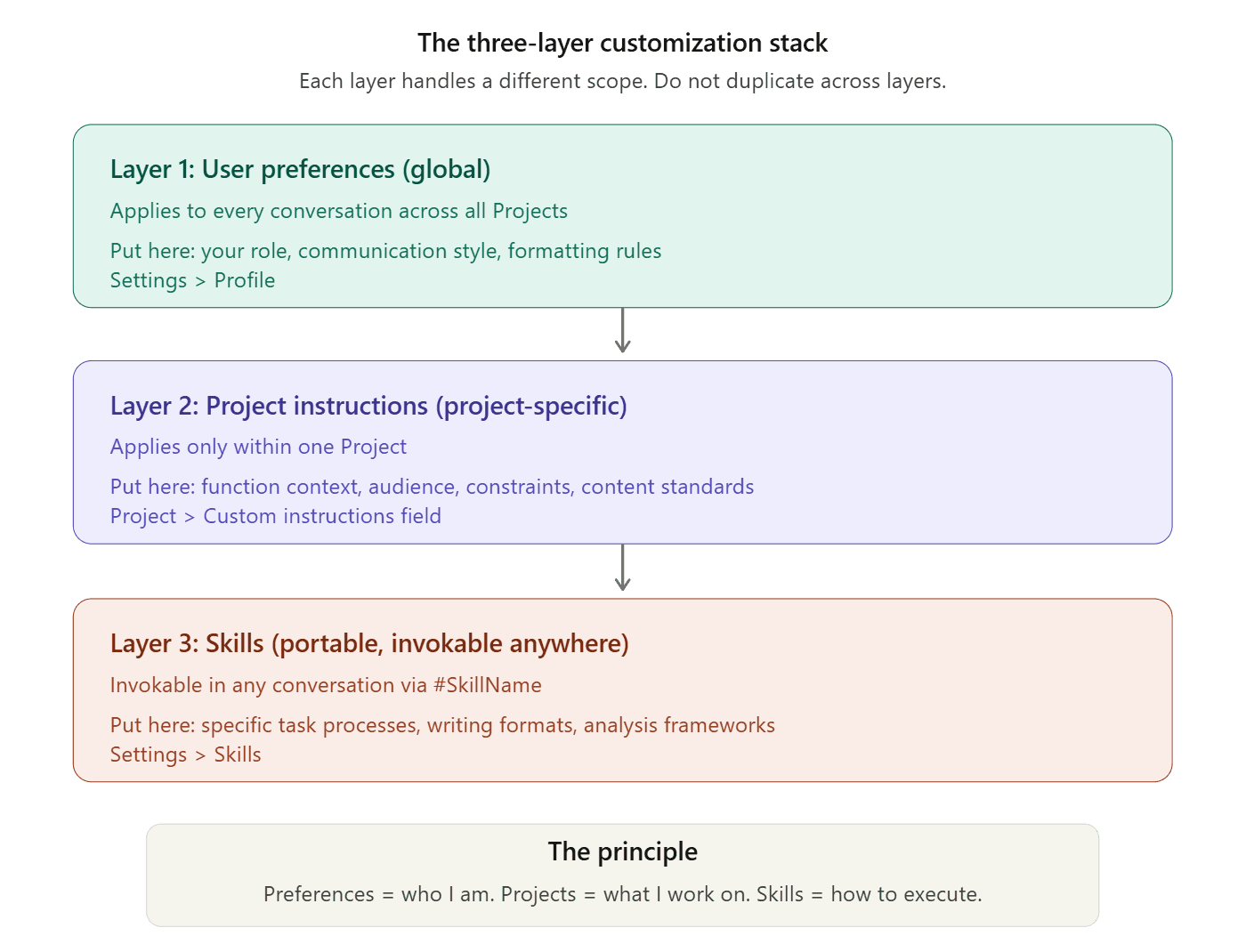
Before building your Projects, understand how Claude's three customization layers interact. Getting this right means each layer handles the right scope, and nothing conflicts.
Layer 1: User Preferences (global, applies everywhere)
Go to Settings, then Profile. These instructions apply to every conversation across all Projects. Put your professional identity and communication preferences here.
Example for a marketing director:
"I am a marketing director at a B2B SaaS company. I prefer concise, direct responses. Skip preambles and get to the actionable insight. Use data to support recommendations. Do not use em dashes. Do not use corporate jargon like 'leverage,' 'synergize,' or 'cutting-edge.' When I ask for content, write in an active voice with short paragraphs."
Layer 2: Project Instructions (project-specific, applies within one Project)
These are the custom instructions inside each Project. They define the context, constraints, and behavior for that specific marketing function. This is where the templates below go.
Layer 3: Skills (portable, invokable anywhere)
Skills are reusable instruction packages you can call into any conversation with a hashtag (#BrandVoice, #BlogWriter). They encode specific processes and formats.
The principle: User Preferences handle "who I am and how I communicate." Project Instructions handle "what I am working on and what Claude needs to know." Skills handle "how to execute a specific task format."
Do not duplicate information across layers. If your brand voice is in a Skill, do not also paste it into every Project's instructions. Reference it instead: "When writing content, invoke #BrandVoice for tone and style."
The Five-Project System for Marketing Teams
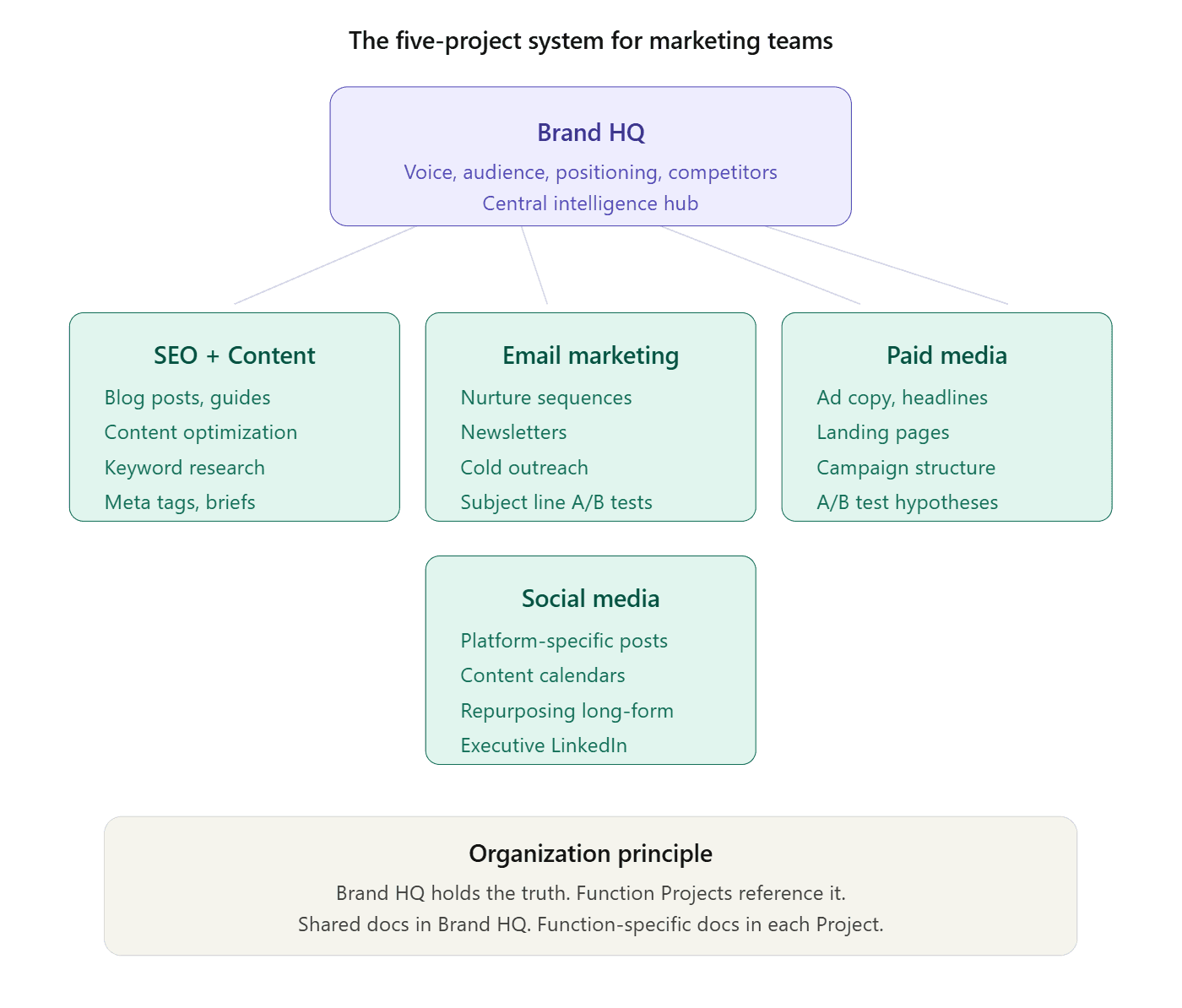
Create these five Projects. Each one handles a distinct marketing function with its own context, documents, and instructions. This structure prevents the "one mega-Project" problem where Claude gets confused by competing instructions.
Project 1: Brand HQ (Your Central Intelligence Hub)
This is your foundational Project. It contains everything about your brand, audience, and positioning. Other Projects reference this one conceptually, but each maintains its own focused instructions.
Custom instructions (copy and adapt):
Documents to upload:
Brand style guide (PDF or DOCX)
3-5 examples of your best-performing content with annotations explaining why each one works
Competitor analysis document
Customer research or survey data
Product/service one-pager with features and benefits
Audience persona documents
When to use this Project: Strategic planning, messaging workshops, positioning exercises, competitive analysis, campaign briefs, and any task where Claude needs your complete brand context.
Project 2: SEO and Content Production
This Project handles blog posts, guides, landing page copy, and content optimization. It contains your SEO methodology, keyword data, and content standards.
Custom instructions (copy and adapt):
Documents to upload:
Your top 5 best-performing blog posts (as examples of quality and voice)
Current keyword research spreadsheet or export
Content calendar or editorial plan
Internal linking map (list of key URLs and their target topics)
Competitor content examples you want to match or surpass
SEO principles guide or your internal SEO playbook
When to use this Project: Writing blog posts, creating content briefs, optimizing existing content, building topic clusters, writing meta tags, and any SEO-related content task.
Project 3: Email Marketing
This Project handles email campaigns, nurture sequences, newsletters, and cold outreach. It contains your email performance data and audience segmentation.
Custom instructions (copy and adapt):
Documents to upload:
Your 10 best-performing emails (with open/click rate data annotated)
Email style guide or brand voice document
Audience segmentation definitions
Current nurture sequence outlines
Competitor email examples (sign up for their lists and save good ones)
When to use this Project: Drafting any email type, creating nurture sequences, writing subject lines, planning email campaigns, and analyzing email performance.
Project 4: Paid Media and Advertising
This Project handles ad copy, landing pages, campaign strategy, and performance analysis for paid channels.
Custom instructions (copy and adapt):
Documents to upload:
Top-performing ad creative with performance data
Landing page copy for current campaigns
Audience targeting documentation
Campaign performance reports (CSV exports from ad platforms)
Competitor ad examples (use Meta Ad Library, Google Ads Transparency Center)
When to use this Project: Writing ad copy, creating landing pages, planning campaign structures, analyzing performance data, and generating A/B test ideas.
Project 5: Social Media and Community
This Project handles social content, community engagement, and platform-specific copy.
Custom instructions (copy and adapt):
Documents to upload:
Top 10 best-performing social posts with engagement data
Social media style guide
Content pillar definitions
Executive LinkedIn profile briefs (if ghostwriting for leaders)
Competitor social examples you admire
Platform-specific best practices document
When to use this Project: Drafting social posts, planning content calendars, repurposing blog content for social, writing LinkedIn articles for executives, and creating community engagement strategies.
How to Organize Five Projects Without Overlap
The most common mistake is putting brand voice in every Project, audience personas in every Project, and product information in every Project. This creates redundancy, makes updates painful (change one thing and you have to update five Projects), and sometimes creates conflicts when the same information is worded slightly differently across Projects.
Here is the organization principle: Brand HQ holds the truth. Function Projects reference it.
In practice:
Brand HQ contains your complete brand context: voice, audience, positioning, competitors, product details.
Each function Project contains function-specific instructions and references Brand HQ conceptually. For example, your SEO Project instructions say "Write in our brand voice as defined in our Brand HQ Project" rather than re-pasting the entire voice guide.
Upload shared documents to Brand HQ. Upload function-specific documents to each function Project. Your brand style guide lives in Brand HQ. Your keyword research spreadsheet lives in the SEO Project.
If a document is relevant to two or more Projects, upload it to Brand HQ. Do not duplicate it across multiple Projects, because when you update it, you only want to update it once.
Naming convention: Use [Function] + [Company] format: "SEO + Content | [Company Name]," "Email Marketing | [Company Name]," "Paid Media | [Company Name]." This makes Projects scannable in the sidebar and prevents confusion when you have many active Projects.
Why Custom Instructions Make or Break Output Quality
The difference between a Project with good custom instructions and one with generic instructions is the difference between output you can publish with minor edits and output you have to rewrite from scratch.
What bad custom instructions look like:
"You are a helpful marketing assistant. Write good content for our brand. Be creative and engaging."
This tells Claude nothing. "Good content" is undefined. "Creative" means different things to different people. "Our brand" has no specifics. Claude defaults to generic, safe, forgettable output.
What good custom instructions look like:
The templates above. They are specific about voice, constraints, formats, audience context, and what to avoid. They give Claude the decision-making framework it needs to produce output that sounds like your brand, not like a generic AI.
Three principles for writing custom instructions that produce great output:
Show, do not tell. "Write in a friendly tone" is vague. "Write like a knowledgeable colleague explaining something over coffee. Use short sentences. Start with the most interesting point, not the context" is specific and actionable.
Include constraints, not just goals. "Write great email subject lines" gives Claude no boundaries. "Write subject lines under 50 characters, never use ALL CAPS, always lead with a benefit or curiosity hook, and suggest 5 variants for A/B testing" gives Claude a clear framework.
Add negative examples. Claude learns as much from what to avoid as from what to emulate. "Never open a blog post with a definition. Never use 'In today's digital landscape.' Never write 'In this article, we will cover.'" eliminates the most common AI writing clichés.
Your Next Move
Create your Brand HQ Project right now. Copy the custom instructions template from this guide, adapt it for your company in 10 minutes, and upload your brand style guide and 3 best-performing content examples.
Then start a conversation inside that Project and ask Claude to write something you would normally spend 30 minutes on. Compare the output quality to what you get from a context-free Claude chat. The difference is the value of a well-configured Project.
Once Brand HQ is working, build your SEO/Content Project and your Email Project. Within a week, you have a system that eliminates the cold start problem for your three highest-volume marketing tasks.
For the full overview of all Claude features beyond Projects, including Skills, Connectors, and Cowork, see our complete How to Use Claude for Marketing guide. If you want expert help implementing Claude and AI into your marketing operations, Passionfruit's team builds AI-native marketing systems for SaaS and ecommerce brands.
A well-configured Project does not make Claude smarter. It makes Claude informed. And informed Claude produces work you can actually use.
FAQs
How many Projects should a marketing team create?
Start with the five-Project system described above (Brand HQ, SEO/Content, Email, Paid Media, Social). Add more only when you have a function with genuinely distinct context needs. A Product Launch Project or a specific Campaign Project makes sense for major initiatives. Avoid creating a new Project for every small task.
Can my team share Projects?
Yes, on Team ($30/user/month) and Enterprise plans. Shared Projects ensure everyone on your team works with the same instructions, documents, and brand context. This eliminates the "everyone has their own version of the brand guide in their own Claude setup" problem.
How often should I update Project instructions?
Review monthly. Update whenever your brand positioning changes, when you notice recurring output quality issues (which means your instructions need a new constraint), when you launch new products or enter new markets, or when your audience personas evolve. Treat instructions as a living document, not a set-and-forget configuration.
Do free Claude users get access to Projects?
Yes. Free users can create up to 5 Projects. Pro users get unlimited Projects with enhanced RAG capabilities. For marketing teams, Pro ($20/month) is the minimum recommended plan because you need more than 5 Projects and the extended context window.
What file types can I upload to Projects?
Claude supports PDF, DOCX, CSV, TXT, HTML, and MD files, with up to 30MB per file. For marketing teams, the most useful uploads are brand guides (PDF), content examples (DOCX or MD), keyword research (CSV), competitor analysis (PDF), and performance data exports (CSV).
Should I put my brand voice in a Project or a Skill?
Put comprehensive brand context (audience, positioning, competitors, product details) in the Brand HQ Project. Put your specific writing style and formatting rules in a Skill (#BrandVoice). This way, the brand context is always present in Brand HQ conversations, and the writing style is portable to any conversation in any Project via the Skill hashtag.
What is the difference between Claude Projects in the web UI and Claude Code?
Claude Projects on claude.ai are the web-based workspace described in this guide. They are designed for marketers, strategists, and non-technical users. Claude Code is a command-line tool for developers. Most marketers should use the web UI Projects. If you have a developer on your team who builds marketing automations, they might use Claude Code for technical tasks. Both use the same underlying model.