SEO
Join 500+ brands growing with Passionfruit!
In today’s digital world, your web address is often the first thing people see. If you’re curious about what are vanity URLs, how to create a vanity URL, and why these custom links matter, you’re in the right place. This guide explains the vanity URL meaning, what is a vanity link, and gives you a detailed, step-by-step approach to creating your own. You’ll also find practical examples, real-world data, and a helpful, relevant table to make your decision easier.
Introduction: The Power of Vanity URLs
Vanity URLs are more than a branding tool—they’re a proven way to increase click-through rates, build trust, and simplify marketing analytics. According to industry research, using branded or custom URLs can boost click-through rates (CTR) by up to 39% compared to generic links. Over 90% of top brands use vanity URLs for their campaigns, highlighting their effectiveness in both online and offline marketing.
Vanity URL vs. Vanity Domain vs. Vanity Page: Clearing Up the Confusion
People use these terms interchangeably, but they mean different things — and confusing them leads to setup mistakes that break links or damage SEO.
Vanity URL. A short, branded path on an existing domain that redirects to a longer, real URL. Example: brand.com/sale → brand.com/products/summer-clearance-2026?utm_source=email. The URL lives on your primary domain and is the most common use case for marketing campaigns.
Vanity domain. A completely separate domain name that's shorter or more memorable than your primary one, often used by large brands for campaigns. Example: Coca-Cola might register shareacoke.com and point it to a page on coca-cola.com. Vanity domains require their own DNS setup and usually cost more because you're buying a domain, not just creating a redirect.
Vanity link. Used interchangeably with "vanity URL" in most contexts. If someone says "create me a vanity link for this campaign," they almost always mean a branded short URL.
Vanity page. A dedicated landing page (often on your main domain at a vanity URL) created for a specific campaign, audience, or partner. "Vanity page" describes the destination; "vanity URL" describes the link that gets you there.
Vanity website. A standalone site built for vanity or ego purposes (personal portfolios, memorial sites, one-off campaign microsites). Less common in modern marketing.
Vanity email. A custom email address using your brand's domain (hello@brand.com) instead of a generic free provider. Related concept, separate setup — you configure vanity emails through your email host (Google Workspace, Microsoft 365), not through a URL redirect tool.
The practical takeaway: for 95% of marketing use cases, what you actually want is a vanity URL on your existing domain. Skip buying new domains unless you have a specific campaign-naming reason to do so.
Vanity URL Meaning: What Is a Vanity Link?
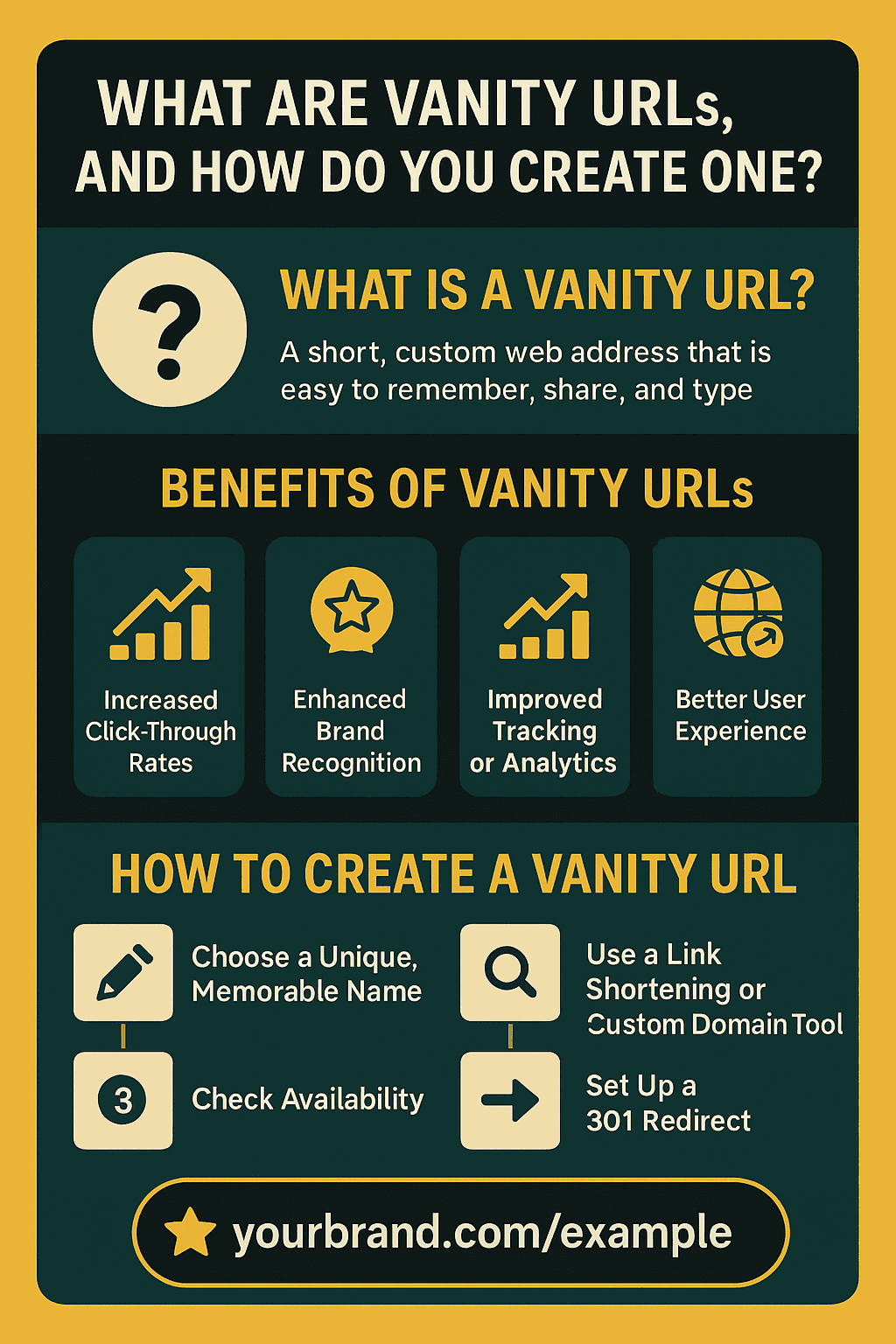
A vanity URL is a short, custom web address that’s easy to remember, share, and type. Instead of long, complicated URLs filled with numbers and tracking codes, you get a branded link like yourbrand.com/sale or brand.com/summerdeal. This is what is a vanity link—an address that’s both functional and memorable.
Vanity URLs are:
Short and simple
Branded with your company, product, or campaign name
Redirects to a longer, more complex URL seamlessly
They’re also called branded links or custom URLs and are widely used in marketing, social media, print ads, and more.
(Source: Created Internally)
How to Create a Vanity URL in WordPress
If you're on WordPress, you have three paths — easiest to most flexible:
Option 1: Use a redirect plugin (easiest, 5 minutes). Install a free plugin like Redirection or Simple 301 Redirects from the WordPress plugin directory. Go to the plugin settings, add a new redirect with your vanity URL (e.g., /sale) as the source and your long URL as the destination, and select "301 Permanent" as the redirect type. Save. Done — your vanity URL is live.
Option 2: Rank Math or Yoast SEO (if you already use them). Both SEO plugins include a redirect manager. In Rank Math: Dashboard → Redirections → Add New → enter source and destination. In Yoast Premium: SEO → Redirects → Add new. These are slightly more robust than stand-alone redirect plugins because they integrate with your SEO settings.
Option 3: Edit your .htaccess file (advanced, most control). If you're comfortable with server files, add this line to your .htaccess file (above the # BEGIN WordPress block):
This is faster than a plugin (one less database call) and survives plugin conflicts, but requires FTP or file manager access.
Create a vanity landing page in WordPress. If you want the vanity URL to land on a custom page rather than redirect elsewhere, simply create a WordPress page with the slug matching your vanity URL (yourdomain.com/sale) and publish. This keeps everything on one URL without redirects, which is cleaner for SEO when the vanity URL is permanent.
Common WordPress vanity URL mistakes to avoid:
Using
?characters in the vanity slug (WordPress will interpret them as query parameters)Forgetting to flush permalinks after setup (Settings → Permalinks → Save Changes)
Creating vanity URLs that conflict with existing page slugs or category archives
Using capital letters (URLs are case-sensitive; stick to lowercase)
How to Create a Vanity URL on Other Platforms
Every major platform handles vanity URLs slightly differently. Here's the quick reference:
Shopify. Shopify's URL structure is partly fixed (/products/, /collections/, /pages/) but you can create vanity URLs through the Navigation settings or by adding URL redirects in Online Store → Navigation → URL Redirects. Type your vanity slug in the "Redirect from" field and the destination in the "Redirect to" field. For a custom short URL outside Shopify's structure, you'll need a third-party redirect app or a subdomain setup.
Webflow. Use the built-in 301 redirects feature in Project Settings → Publishing → 301 Redirects. Enter "Old path" (your vanity URL) and "Redirect to page" (the destination). Webflow handles the rest at the hosting level.
Squarespace. Settings → Advanced → URL Mappings. Use the format /vanityslug -> /actual/destination 301 (one line per redirect). Save.
HubSpot. Settings → Website → Domains & URLs → URL Redirects. HubSpot supports both 301 (permanent) and 302 (temporary) redirects, plus regex-based redirects for pattern matching — useful if you're setting up many campaign vanity URLs at once.
Bitly and TinyURL (third-party shorteners). If you don't have a custom domain or want a shorter link than your domain allows, Bitly's free tier lets you create one custom-branded short link per account. Paid tiers ($35+/month) let you connect a branded short domain (e.g., bran.dy) and create unlimited vanity URLs. TinyURL offers a similar but simpler setup.
Cloudflare (advanced, any platform). If you use Cloudflare as your DNS/CDN, you can create "Redirect Rules" that work regardless of your underlying platform. This is the fastest-performing option because the redirect happens at Cloudflare's edge, before the request ever reaches your origin server.
Why Use Vanity URLs? The Benefits
Vanity URLs offer measurable benefits for brands, marketers, and content creators.
1. Increased Click-Through Rates
Branded, memorable links can increase CTR by up to 39% compared to generic or long URLs.
2. Enhanced Brand Recognition
Including your brand or campaign name in the URL reinforces your identity and makes your links stand out.
3. Improved Tracking and Analytics
Vanity URLs make campaign tracking easier. By assigning unique URLs to each campaign or channel, you can track performance, measure conversions, and optimize your strategy.
4. Better User Experience
Short, clear URLs are easier to share on social media, in print, or verbally. They reduce confusion and make it simple for users to reach your intended destination.
5. SEO and Shareability
While vanity URLs themselves aren’t indexed by search engines if they redirect, including relevant keywords can indirectly boost SEO by increasing shareability and attracting backlinks.
How to Create a Vanity URL: Step-by-Step Guide
Creating a vanity URL is straightforward, but following best practices ensures maximum impact.
Step 1: Choose a Unique, Memorable Name
Pick a name that reflects your brand, campaign, or the page’s purpose. Keep it under 20 characters, easy to spell, and free from special characters.
Step 2: Check Availability
Verify that your chosen vanity URL isn’t already in use. Check across your website and social platforms for consistency.
Step 3: Use a Link Shortening or Custom Domain Tool
Use tools like Bitly, TinyURL, or your website’s built-in features to create and manage vanity URLs. Many platforms let you customize the URL ending to match your brand.
Step 4: Set Up a 301 Redirect
A 301 redirect ensures your vanity URL points to the intended destination. This can be set up via your hosting control panel, a plugin (for WordPress), or by editing your .htaccess file.
Step 5: Test and Promote Your Vanity URL
Test your vanity URL to ensure it works as expected. Then, use it in marketing materials, social media, emails, and anywhere you want to drive traffic.
Vanity URLs for Multi-Location and Multi-Brand Businesses
If you operate multiple locations, franchises, or sub-brands, your vanity URL strategy needs a bit more structure. A common question: should I create a vanity URL for each store or location?
The short answer: yes, if the location-specific URL drives real business value (foot traffic, bookings, local attribution). No, if it's just a vanity exercise.
Good use cases for per-location vanity URLs:
Franchise locations with distinct promotions (
brand.com/chicago-loopfor a specific store's campaign)Event-driven local campaigns (
brand.com/austin-sxsw-2026)Print materials for a specific store (
brand.com/pasadenaon a flyer distributed only in Pasadena)Local influencer partnerships where you need clean attribution per influencer
Structure that works at scale:
Use a consistent URL format across all locations:
brand.com/[city]orbrand.com/[store-id]Keep all vanity URLs on your primary domain, not scattered across location subdomains (unless you have a strong SEO reason for subdomains)
Set up tracking at creation time — retrofitting analytics across 50 vanity URLs later is painful
Document every vanity URL in a central spreadsheet with: slug, destination, owner, campaign, creation date, planned sunset date
Multi-brand companies: if you operate multiple brands under one parent (e.g., a restaurant group with three different cuisines), each brand should live on its own domain. Vanity URLs should live on the brand-specific domain, not the corporate parent domain, so the short URL reinforces the brand the customer is actually buying from.
Example: Creating a Vanity URL for a Campaign
Instead of sharing www.brand.com/products/sale?utm_source=facebook, create brand.com/summer—making it easier to remember, share, and track.
Additional best practices worth knowing:
Avoid trademarked terms you don't own. Never create
brand.com/nikeorbrand.com/disneyunless you're authorized to reference those brands. This applies even for parody or satire.Don't reuse retired vanity URLs for new campaigns immediately. If
brand.com/summerpointed to 2025's summer sale, give it 3-6 months pointing to a neutral landing page before repurposing it — otherwise, backlinks and printed materials from the first campaign will send users to the wrong destination.Monitor for broken vanity URLs quarterly. Destination pages move or get deleted, and nothing kills trust like a marketing flyer pointing to a 404. Set a recurring calendar reminder to test every active vanity URL.
Use HTTPS in the destination URL. Never redirect a vanity URL to an HTTP destination — modern browsers may flag it as insecure, and you'll lose the click.
Keep an audit trail. Maintain a single source of truth (a Notion page or Google Sheet) listing every vanity URL your team has created, who owns it, and what it points to. Without this, vanity URLs become organizational debt that nobody remembers how to update.
Real-World Examples of Vanity URLs
Many leading brands use vanity URLs to simplify their digital presence. Some well-known examples:
Airbnb —
airbnb.com/contactfor customer support,airbnb.com/helpfor the help centerDropbox —
dropbox.com/backupfor backup services,dropbox.com/businessfor B2B plansSlack —
slack.com/get-startedfor onboarding,slack.com/pricingfor plan comparisonMicrosoft —
aka.ms/office(vanity domain + path), used across Microsoft properties to shorten long internal URLsApple —
apple.co/as a branded short domain for all of Apple's social media sharingGoogle —
g.co/searchas the canonical short redirect to Google Search HelpLinkedIn —
linkedin.com/in/yournamefor personal profile vanity URLsNike —
nike.com/runningfor their running product category
Campaign-specific vanity URL examples:
A restaurant running a summer promotion might use
eatbrand.com/summerA gym running a New Year's campaign might use
brand.com/newyearA webinar host promoting verbally on a podcast might use
brand.com/podcastAn event organizer printing flyers might use
brand.com/event2026A nonprofit running a fundraiser might use
brand.com/donate
What makes these examples work:
The URL matches the intent. Nobody has to guess what
slack.com/pricingleads to.They're short enough to remember after hearing once.
They're consistent — once Airbnb claimed
airbnb.com/contact, they kept it. Users now know where it goes without needing to search.They survive rebrands.
airbnb.com/contactcan redirect to any future help-center URL; the vanity URL itself is the promise.
Tools and Generators for Creating Vanity URLs
You don't need to code anything to create vanity URLs. Here are the best tools by use case:
For custom-domain vanity URLs (hosted on your own site):
WordPress redirect plugins — Redirection (free), Simple 301 Redirects (free), Rank Math (free/paid)
Built-in CMS tools — Shopify URL Redirects, Webflow 301 Redirects, Squarespace URL Mappings, HubSpot URL Redirects (all included in their respective platforms)
Cloudflare Redirect Rules — free on any Cloudflare plan; fastest performance
For branded short URLs (using a third-party short domain):
Bitly — the category standard. Free tier supports one branded link per account; paid plans ($35+/month) support unlimited custom-domain short links, click tracking, QR codes, and team management.
Rebrandly — strong free tier (500 links/month on a custom domain), clean interface, popular with small businesses.
Short.io — free custom-domain support, good for developers who want API access.
TinyURL — simple and free; custom aliases available on paid plans ($12.99+/month).
For click tracking and analytics on vanity URLs:
Google Analytics with UTM parameters — the free baseline. Combine vanity URLs with UTM tracking on the destination URL to measure campaign performance.
Bitly and Rebrandly both include built-in click analytics
Plausible or Fathom — privacy-friendly alternatives to Google Analytics that work well with vanity URL tracking
Free vanity URL generators:
Bitly free tier — one custom-branded link
Rebrandly free tier — 500 branded links/month
TinyURL free tier — unlimited non-branded short URLs, with custom aliases on paid plans
For most small businesses, the right answer is: use your existing CMS's built-in redirect feature (free) for vanity URLs on your main domain, and add Bitly or Rebrandly only if you need a separate short-branded domain.
Best Practices for Vanity URLs
For the best results, follow these proven tips:
Keep it short and memorable: Aim for under 20 characters.
Use relevant keywords: Choose words related to your brand or campaign.
Be consistent: Use the same naming style across all channels.
Avoid special characters: Stick to letters and numbers only.
Make it intuitive: The destination should be clear from the URL.
Use lowercase: URLs are case sensitive; lowercase is safest.
Common Uses for Vanity URLs
Vanity URLs are versatile and can be used in many scenarios:
Marketing campaigns (e.g., brand.com/holiday)
Social media bios and posts (e.g., instagram.com/yourbrand)
Print materials (flyers, business cards)
Event promotions (e.g., brand.com/webinar)
Influencer and affiliate links
Real-World Examples
Many leading brands use vanity URLs to simplify their online presence:
Airbnb: airbnb.com/contact for customer support
Dropbox: dropbox.com/backup for backup services
Slack: slack.com/get-started for onboarding
These examples show how clear, branded URLs make it easier for users to find and remember key pages.
Tracking Vanity URL Performance
One of the biggest advantages of vanity URLs is the ability to track performance. Assign unique URLs to each campaign or channel to see which efforts drive the most traffic and conversions. Tools like Google Analytics or built-in features from URL shorteners make this process simple.
Table: Key Features and Benefits of Vanity URLs
Feature | Description | Why It Matters |
Memorability | Short, branded, easy to recall | Increases direct traffic and sharing |
Brand Consistency | Reflects your brand or campaign | Boosts trust and recognition |
Shareability | Easy to use in print, social, and verbal communication | Expands reach across channels |
Tracking Capabilities | Unique links for each campaign or channel | Enhances analytics and optimization |
User Trust | Looks professional and trustworthy | Higher click-through rates |
Flexibility | Can be updated to redirect as needed | Adapts to changing campaigns |
SEO Potential | Keyword inclusion in URL slugs | Increases shareability and backlinks |
Offline Usability | Simple enough for print and spoken word | Drives cross-channel engagement |
How Vanity URLs Impact Marketing
Vanity URLs are especially effective in offline marketing, such as print ads, billboards, and business cards, where space is limited and memorability is crucial. They’re also valuable in digital marketing for A/B testing, influencer campaigns, and retargeting.
Offline marketing: Easier for users to recall and type later.
A/B testing: Unique URLs for each version make comparison easy.
Retargeting: Integrated with UTM and analytics for precise audience targeting.
Conclusion
Vanity URLs are a simple yet powerful way to enhance your online presence. They make links more memorable, improve marketing results, and provide better tracking. By following the steps and best practices above, you can create vanity URLs that support your brand and engage your audience.
FAQ: Everything You Need to Know About Vanity URLs
1. What is a vanity URL?
A vanity URL is a custom, branded web address that replaces a long, complex URL with something short, memorable, and easy to share.
2. How do I create a vanity URL?
Choose a unique, easy-to-remember name
Check if it’s available
Use a tool or website setting to create the URL
Set up a 301 redirect
Test and use your new link
3. What are the benefits of using vanity URLs?
Up to 39% higher click-through rates
Builds brand trust and recognition
Easier to share and remember
4. Can vanity URLs help with SEO?
Vanity URLs do not directly improve SEO if they redirect, but they can help indirectly by making your links more shareable and increasing the chances of earning backlinks.
5. Where can I use vanity URLs?
Social media profiles and posts
Print ads and business cards
Email campaigns
Event promotions
Affiliate and influencer marketing
6. What's the difference between a vanity URL and a vanity domain?
A vanity URL is a short, branded path on your existing domain (brand.com/sale). A vanity domain is an entirely separate domain name (shareacoke.com) that you register and point to a destination. Vanity URLs require a simple redirect setup; vanity domains require DNS configuration and an additional domain registration. For most marketing campaigns, a vanity URL on your main domain is sufficient.
7. What's the difference between a vanity URL and a regular redirect?
A vanity URL is a redirect, but one specifically designed to be short, memorable, and brand-facing — typically for marketing campaigns, print ads, or verbal promotion. A regular redirect is any URL-to-URL mapping, often used for technical purposes like fixing broken links or handling site migrations. Every vanity URL is a redirect; not every redirect is a vanity URL.
8. How do I create a vanity URL in WordPress?
Three options. The easiest: install a free plugin like Redirection or Simple 301 Redirects, add a new redirect with your vanity slug as the source and the destination URL as the target, and select 301 Permanent. Alternatively, if you use Rank Math or Yoast SEO, both include redirect managers. For maximum performance and control, add the redirect directly to your .htaccess file. Always flush your permalinks (Settings → Permalinks → Save) after creating redirects.
9. How do I create a vanity URL on Shopify?
Go to Online Store → Navigation → URL Redirects. Click "Create URL redirect." Enter your vanity URL slug in "Redirect from" and the destination in "Redirect to." Save. For a branded short URL outside Shopify's structure (like shop.brand.com/sale), you'll need a subdomain setup or a third-party tool like Bitly with a custom branded domain.
10. What's the best vanity URL service for marketing campaigns?
For vanity URLs on your own domain, your CMS's built-in redirect feature (Shopify, Webflow, WordPress plugins, HubSpot, Squarespace) is free and sufficient. For branded short URLs on a separate short domain, Bitly is the category standard ($35+/month for custom domains), with Rebrandly as a strong free-tier alternative (500 branded links/month). For technical teams wanting edge performance, Cloudflare Redirect Rules are free and faster than application-level redirects.
11. Are there free vanity URL generators or tools?
Yes. Bitly offers one free branded link per account. Rebrandly's free tier includes 500 branded links per month on a custom domain. Any major CMS (WordPress, Shopify, Webflow, Squarespace, HubSpot) includes free redirect tools for vanity URLs on your existing domain. For most small businesses, the CMS built-in option is the right starting point.
12. Do vanity URLs affect SEO?
Indirectly, yes. Vanity URLs themselves are typically 301 redirects, so search engines follow them to the destination and pass link equity there. The SEO benefit comes from three things: (1) increased shareability, which drives more backlinks to the destination, (2) higher click-through rates on branded links in search results and social posts, and (3) the ability to keyword-target the destination page URL. Vanity URLs don't directly rank — the destination page does — so optimize the destination page for SEO and use the vanity URL for marketing and shareability.
13. How do I track vanity URL performance?
Three layers. First, add UTM parameters to the destination URL so Google Analytics can attribute traffic to the vanity campaign (e.g., ?utm_source=print&utm_medium=flyer&utm_campaign=summer2026). Second, use your URL shortener's built-in click analytics (Bitly and Rebrandly both include this). Third, set up conversion tracking on the destination page so you can tie vanity URL clicks to actual business outcomes — purchases, sign-ups, bookings. If all three are set up, you'll know not just how many people clicked, but which vanity URL drove the highest-value customers.
14. Should I create a vanity URL for each store or location?
Yes, if your business has location-specific promotions, events, or campaigns that need attribution. Use a consistent format across locations (brand.com/[city] or brand.com/[store-id]), keep all vanity URLs on your primary domain, and set up tracking at creation time. Avoid creating location-specific vanity URLs just for the sake of it — each one adds maintenance overhead. Create them only when they'll drive measurable business value.
15. What is a vanity URL in Hootsuite?
Hootsuite's social media management platform includes a vanity URL feature that lets you create branded short links using either Bitly (integrated) or Hootsuite's own Ow.ly shortener. In Hootsuite terminology, a vanity URL is best described as a custom-branded short link used for tracking and sharing content across social media posts — for example, a Hootsuite user might create ow.ly/yourcampaign to replace a long destination URL before posting to Twitter, LinkedIn, or Facebook.
16. What is a vanity email address, and is it related to a vanity URL?
A vanity email address uses your brand's domain (hello@yourbrand.com) instead of a generic provider (yourbrand@gmail.com). It's a related branding concept but a separate technical setup — vanity emails are configured through your email host (Google Workspace, Microsoft 365, Fastmail), not through URL redirects. Both vanity emails and vanity URLs serve the same goal: making your brand look professional and trustworthy across every customer touchpoint.
17. How long does a vanity URL last? Can I change where it points?
A vanity URL lasts as long as the redirect rule exists — there's no expiration date built into the technology. You can change the destination at any time by updating the redirect rule in your CMS, plugin, or short-URL tool. This flexibility is one of the biggest advantages of vanity URLs: a printed flyer with brand.com/event2026 can be updated mid-campaign if the destination page changes, without reprinting anything.